Assesments
This page describes the structured process of creating, submitting and approving an assessment for an LLM API.
Step by Step Guide
- Click the "Start Assessment" button.
- Choose a project, an assessment type and an LLM API for the assessment.
- Provide a name/title for the assessment.
- Select questionnaire templates to be associated with the assessment.
- Click the "Create" button to finalize the process.
Upon creating the assessment, corresponding questionnaires are generated based on the selected questionnaire templates. The naming convention for each questionnaire follows the pattern: assessment name + questionnaire template name.
After creating the assessment, you can navigate to its home page from the assessment listing table. Here, you'll find the status of the assessment and related questionnaires. You can also leave comments on the assessment.
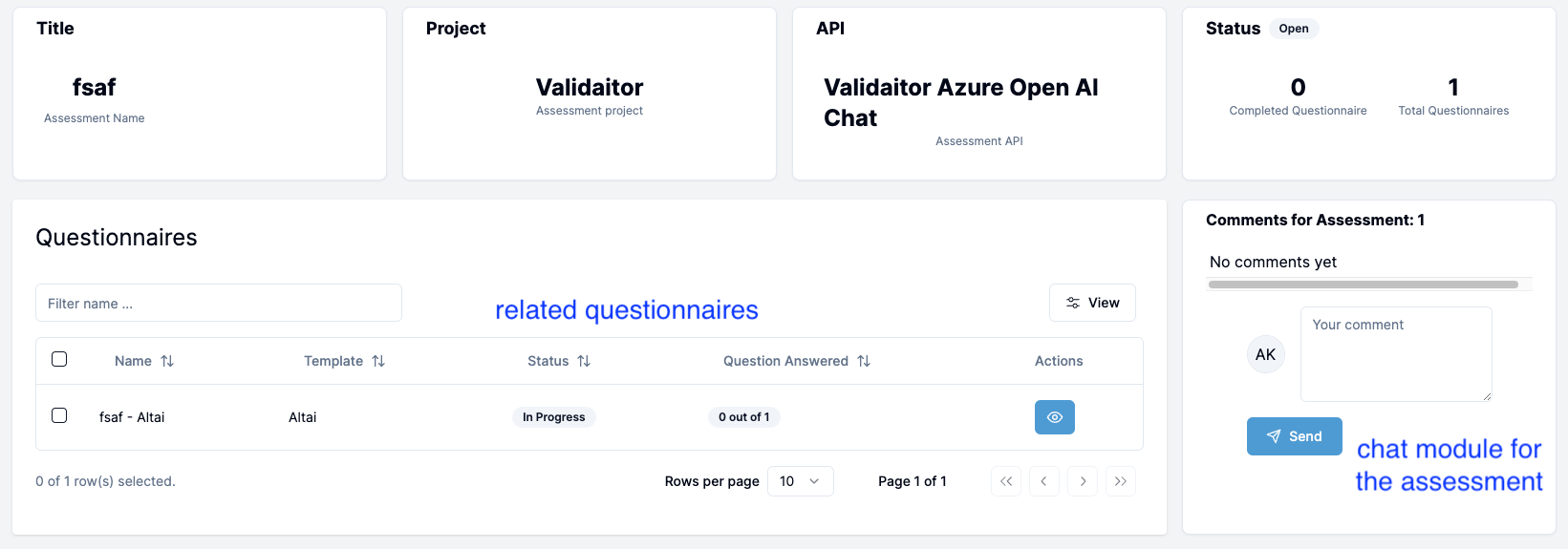 The assessment has three status:
- Open : This initial stage occurs upon assessment creation. At this point, related questionnaires of the assessment are
In ProgressorCompletedstage. -
Submitted : Once all related questionnaires are completed, the assessment can be submitted for the approval process. Once submitted, no further changes can be made to the respective questionnaires.

-
Approved : Users with necessary permissions can approve or reject the assessment. If approved, the assessment moves to the approved stage marking the completion of the entire process. If rejected, the assessment reverts to the
Openstage allowing users to revise and resubmit the assessment.
Approval Permissions
There are different role permissions for the assessment submission and approval process in the platform. This permission is also dependent on the type of the assessment.
Assessment Type
-
Self Assessment (SA): User with the role of
AI DeveloperandAI Managercan submit the assessment. And onlyAI Managercan approve or reject the assessment. -
Internal Auditing (IA): User with the role of
AI Managercan submit the assessment. And onlyInternal AI Auditorcan approve or reject the assessment. -
External Auditing (EA): User with the role
AI Managercan submit the assessment. And onlyExternal AI Auditorcan approve or reject the assessment.